gpt-image-2 提示词分享:技术图解与信息图
整理适合技术方案、架构说明、报告插图和 Mermaid 重构的 gpt-image-2 提示词模板。
技术内容最怕两件事:一是图里什么都有,读者什么都抓不住;二是图看起来很漂亮,但技术链路已经变形。
这一篇只放偏技术说明的 prompt。它们的共同点是先压缩信息,再安排主路径、节点角色、线条层级和结论位置。图可以好看,但不能为了好看把机制讲错。
这个系列里的模板主要来自 @xiaoxiaodong01 和 @MrLarus 的公开分享,在这里一并致谢。这里记录的是我用 gpt-image-2 跑过以后,觉得还值得复用的用法。
English version: gpt-image-2 Prompt Patterns: Technical Diagrams And Infographics
系列入口见 gpt-image-2 优秀提示词分享:可复用的生图模板。
案例 1:手绘知识图解
开发者最常缺的不是图,而是能把一堆机制讲清楚的图。
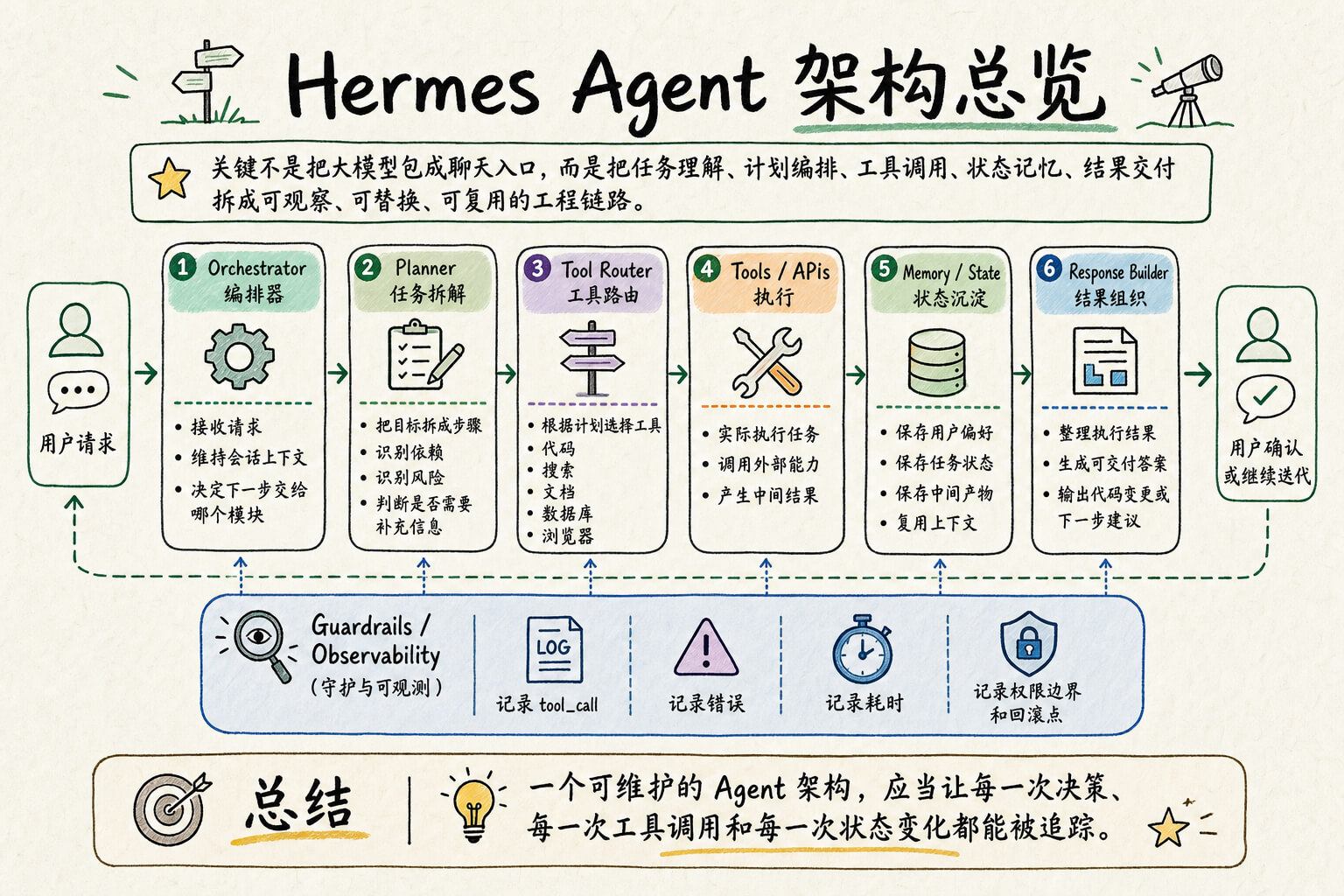
我拿 “Hermes Agent 架构总览” 做测试,是因为这类内容很容易画成两种极端:要么像一张冷冰冰的流程图,要么把所有文字塞满画布。这个 prompt 的好处是,它会先要求模型压缩信息,再用模块、箭头、标签和底部结论建立阅读路径。
成图里标题、主链路、Guardrails / Observability 和底部总结都还算清楚。用在正式技术文章里时,输入内容最好控制在 6 个模块以内。模块再多,模型也能画,只是中文小字开始变得不稳。
生成备注:
- 模型:
gpt-image-2 - 尺寸:
1536x1024 - 输出:JPEG,压缩后约 359 KB
- 测试输入:Hermes Agent 架构总览
- 适合:技术方案图、架构总览、复盘汇报、知识卡片、团队分享配图
测试输入大意如下:
Hermes Agent 架构总览

核心判断:Hermes Agent 的关键不是把大模型包成聊天入口,而是把「任务理解、计划编排、工具调用、状态记忆、结果交付」拆成可观察、可替换、可复用的工程链路。

主链路:
用户请求 → Orchestrator 编排器 → Planner 任务拆解 → Tool Router 工具路由 → Tools / APIs 执行 → Memory / State 状态沉淀 → Response Builder 结果组织 → 用户确认或继续迭代

关键模块:
1. Orchestrator:接收请求,维持会话上下文,决定下一步交给哪个模块。
2. Planner:把目标拆成步骤,识别依赖、风险和需要补充的信息。
3. Tool Router:根据计划选择代码、搜索、文档、数据库、浏览器等工具。
4. Memory / State:保存用户偏好、任务状态、中间产物和可复用上下文。
5. Guardrails / Observability:记录 tool_call、错误、耗时、权限边界和回滚点。
6. Response Builder:把执行结果整理成可交付答案、代码变更或下一步建议。

底部结论:一个可维护的 Agent 架构,应当让每一次决策、每一次工具调用和每一次状态变化都能被追踪。
可复制模板:
请把我提供的内容转化成一张高可读性的手绘知识图解。风格像认真整理过的创意手帐 + 白板推演 + 咨询报告信息图,而不是冰冷模板。

【输出目标】
生成一张适合传播、汇报和复用的知识图解。它必须先让人抓住核心判断,再沿着模块逐步阅读,最后记住一句结论。

【语言要求】
图上所有可见文字根据用户的输入来确定语言,中文,英文或其他。
不要混用语言,除非是技术名词、产品名、协议名、代码路径或数字指标。

【画布要求】
比例:{16:9 / 5:4 / 4:3 / 21:9}
质量:4K high resolution
背景:浅米白 / 浅暖灰,保留轻微纸张纹理和呼吸感。
整体清晰、留白稳定,不要把文字挤到看不清。

【信息设计规则】
不要逐字搬运原文。先压缩信息,再画图。
请把内容整理成:
1. 顶部:强标题 + 一句话核心判断
2. 中部:3–6 个主模块,按流程、对比、阶段或因果关系排列
3. 模块内:每个模块最多 3–5 条短 bullet
4. 底部:一条 Flow Summary / Decision Summary / Bottom Line
5. 如果内容很多,只保留最关键的 8–10 个判断,避免微型文字

【可读性规则】
标题必须最大、清楚、有重量。
模块标题要有秩序,正文必须短句化。
每个模块不要超过 6 行正文。
每条 bullet 尽量简短。
不要使用密密麻麻的小字表格。
不要为了完整而牺牲可读性。

【视觉风格】
黑色或深墨色手写线条建立阅读骨架。
使用圆角分区、细线框、轻阴影、编号、箭头、标签和小图标。
线条允许轻微手绘抖动,但整体对齐、边距、分组要稳定。
图标只做路标和强调,不要抢走文字层级。

【配色规则】
使用克制的标记笔色彩:
浅米白背景 + 黑色主线条;
低饱和青绿、鼠尾草绿、淡紫、柔橙、浅蓝作为分区和路径颜色。
避免霓虹色、强渐变、过度商业光效和整页单色化。
彩色区域只占少量到中等面积。

【准确性规则】
严格保持输入内容中的技术链路、组件名称、箭头方向、协议、端口、数据流和判断。
不要自行新增未提供的组件。
不要把动作写错,例如“读取日志”不能画成“生成日志”。
如果空间不足,优先保留主链路、关键差异和最终判断,删掉次要解释。

【内容】
{请输入你的内容或者参考图片}
案例 2:Mermaid 信息图重构
Mermaid 很适合写在文档里,但不一定适合放在 PPT 或文章头图里。
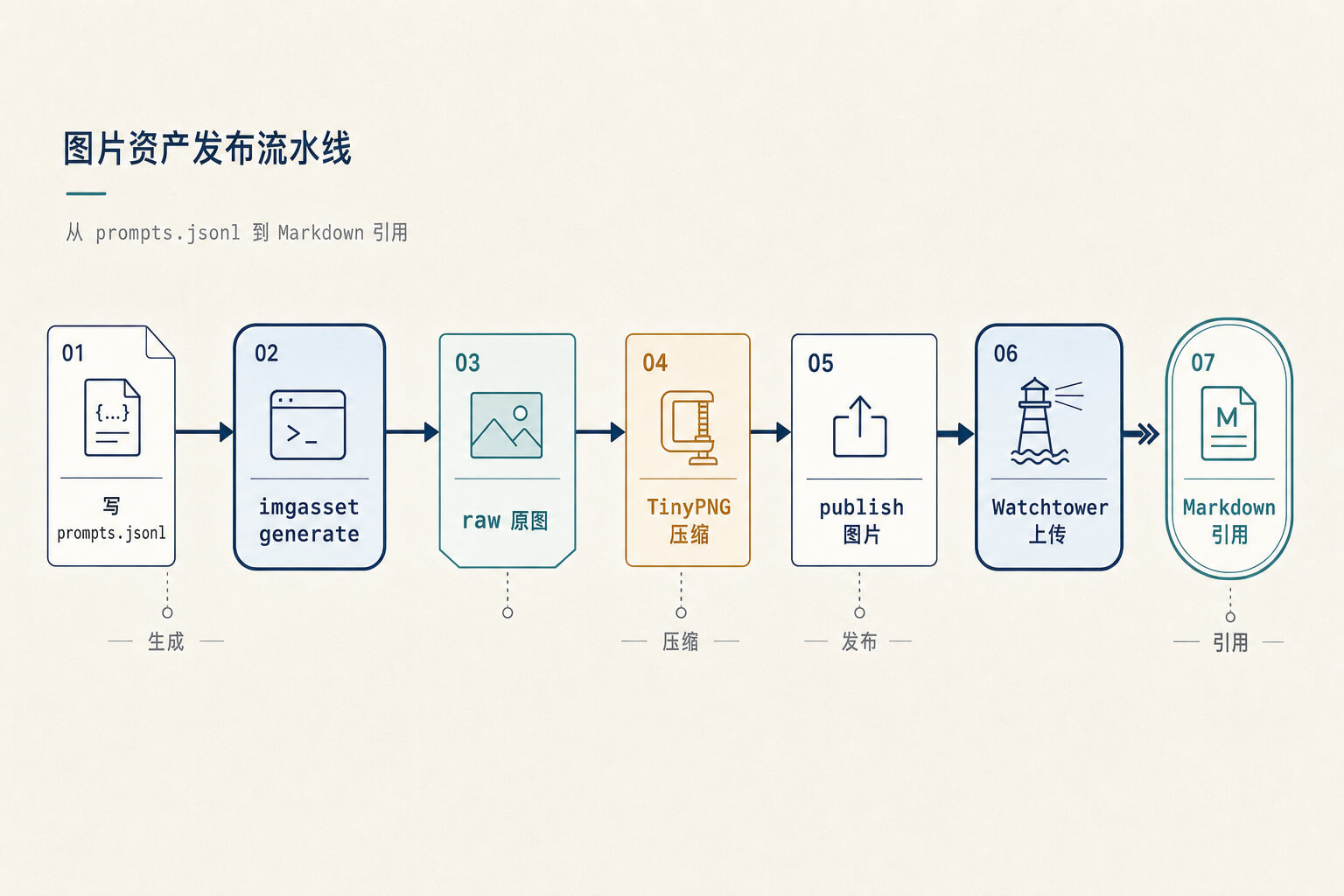
我测试的是一段 imgasset 图片流水线:写 prompts.jsonl,生成原图,压缩,上传,再放进 Markdown。原始 Mermaid 很清楚,但视觉上还是偏工程草图。
这条 prompt 不只是“美化 Mermaid”。它会要求模型先理解语义,再重新组织主路径、节点角色、线条层级和视觉权重。复杂图最好先把输入压短一点。节点太多时,模型为了完整会塞小字,最后反而不如原图。
生成备注:
- 模型:
gpt-image-2 - 尺寸:
1536x1024 - 输出:JPEG,压缩后约 125 KB
- 测试输入:一段
imgasset图片流水线 Mermaid - 适合:技术文档配图、架构讲解、流程说明、PPT 技术页
测试输入:
flowchart LR
  A[写 prompts.jsonl] --> B[imgasset generate]
  B --> C[raw 原图]
  C --> D[TinyPNG 压缩]
  D --> E[publish 图片]
  E --> F[CDN 上传]
  F --> G[Markdown 引用]
可复制模板:
你是高级信息图重构生成器,兼具信息架构师、视觉设计总监、技术机制图设计师能力。

任务:
将用户提供的 Mermaid / C4 / Flowchart / Sequence / State / ER / Timeline 源码,或其渲染图片,重新设计为一张高保真、高审美、专业级信息图。

目标不是美化原图,不是复刻 Mermaid,不是普通流程图换皮。
你必须先理解其语义结构,再重新编译为新的信息架构图。

Output:
生成一张最终高保真信息图。
不要输出分析过程、解释、Markdown、源码或设计说明。

Input truth rules:
1. 如果输入是源码,源码是语义真相。忽略 Mermaid 原始布局、颜色、classDef、节点样式。
2. 如果输入是图片,图片只作为语义提取材料。不得临摹原图布局、配色、节点形状或箭头路径。
3. 图片文字模糊时,只保留可确认信息,不要编造业务逻辑。

Semantic extraction:
提取:
- entities
- groups
- actors
- relationships
- branches
- merges
- loops
- gates
- tools
- stores
- schemas
- states
- outputs
- triggers
- annotations
- dependencies
- observations

Role assignment:
为每个实体分配角色:
- input
- output
- controller
- orchestrator
- processor
- resolver
- decision
- gate
- tool
- storage
- observer
- actor
- artifact
- annotation
- boundary
- event
- state
- terminal
- reference

Primary mechanism:
必须识别唯一主机制,并让它在 3 秒内可见。
主机制类型可为:
- pipeline
- orchestration
- resolver pipeline
- gating
- handoff
- layered system
- lifecycle
- hub-and-spoke
- dependency network
- sequence interaction
- state transition
- artifact-centered flow
- split decision tree
- release / deployment flow

Primary path:
优先提取:
input → controller / processor / decision / resolver → output
主路径必须成为主视觉轴。
辅助关系只能作为分支、回路、引用线、观察线、traceability 线、dependency 线。

Template selection:
- Linear primary path with <= 7 major steps → Core Flow Spine
- Central controller with >= 3 outgoing branches → Orchestrator Hub
- Runtime / gateway / engine / tools / storage → Layered Blueprint
- Validation / conditional branching → Split Gate
- Multi-actor interaction → Swim Relay
- User action + internal state toggle → Interaction State Panel
- Artifact / version / tag resolves execution → Artifact Anchor Resolver
- Entity relationship → Relational Data Grid
- Dense dependency graph → Clustered Zones
- Lifecycle / state transition → Lifecycle Ring

Style selection:
- SDK / Agent / orchestration / migration / platform / architecture → Premium Technical Editorial
- Business process / product flow / user decision → Premium Light
- Documentation / explanatory mapping → Neutral Editorial
- Layered infra / system runtime → Technical Blueprint
- AI / security / real-time observability only → Dark Futuristic
Default style: Premium Technical Editorial

Canvas defaults:
- aspect ratio: 16:10
- canvas target: 1600×1000
- outer padding: 72
- section gap: 56
- node gap: 28–40
- max visible nodes: 18
- max primary path nodes: 7
- max annotation groups: 3

Information compression:
- 同类节点超过 4 个时合并为模块组
- 主路径展开,辅助能力折叠
- 每个节点只保留:名称 + 角色 + 关键约束 / 输出
- 长文本压缩为短标签
- 技术词使用 code token,例如 `tool_call`, `final_output`, `SQLite`, `pom.xml`
- 不生成密集小字表格

Design tokens:
- background: #F7F5F0
- surface: #FFFFFF
- surface_tint_blue: #EEF4FB
- surface_tint_teal: #EEF7F5
- surface_tint_amber: #FCF6EA
- primary: #1C2E4A
- secondary: #2C7A7B
- accent: #B7791F
- text_primary: #1F2937
- text_secondary: #667085
- border: #D8DEE8
- line_main: 2px
- line_aux: 1px
- radius_card: 10px
- radius_pill: 999px

Visual hierarchy:
- controller / orchestrator / core object 权重最高
- main path 最连续、最醒目
- output / terminal 必须有明确收束感
- decision / gate 必须像关键判断点
- storage 稳定低调
- observer / tracing 使用低对比虚线
- tools 像可调用能力,不与主流程平级
- annotation 收纳为侧栏、底栏或微型说明

Node form rules:
- event = compact pill
- process = calm rectangle
- resolver = compact structured block
- decision / gate = logic block or split gate
- artifact = distinct anchor object
- output = terminal capsule
- storage = grounded subtle container
- reference = quiet chip
- observer = low-contrast strip
不要所有节点同尺寸,不要所有节点都画成白色矩形卡片。

Connection rules:
- Sequential flow: strongest line
- Branch / merge: secondary line
- Loop: curved return line
- Handoff: highlighted but restrained connector
- Lookup / reference: thin line
- Observation: low-contrast dashed line
- Dependency: desaturated structural line
- Bidirectional exchange: two-way connector
- Traceability: fine dashed line
主流程线最清楚,辅助线降噪。
箭头头部小而精确。
禁止所有线同色同粗同风格。

Typography:
- modern clean technical editorial sans-serif feeling
- title restrained, not poster-like
- subtitle quieter than title
- section heading clear
- node title readable and prioritized
- supporting text secondary
- edge labels minimal but readable
- Chinese and English mixed typesetting must be aligned and professional
- code token should look monospace-like
- avoid excessive bold text

Icon rules:
- icons are optional and secondary
- icon area must not exceed 12% of node area
- icon size must be smaller than 1.2× node title height
- use consistent small line icons only
- no cartoon icons
- no oversized decorative icons
- no icon on every node
- structure and typography must carry more weight than icons

Background and finish:
- warm off-white or soft technical canvas
- very subtle paper grain or micro-grid allowed
- extremely low visibility only
- no heavy shadow
- no glow
- no glassmorphism
- no 3D
- no loud gradients
- no colorful poster feeling

Legend:
- avoid legend if possible
- if needed, make it extremely small and low contrast
- legend must occupy less than 5% of image height

Language rule:
- node labels follow input language
- code tokens remain in English
- annotations match input language unless user specifies otherwise

Overload handling:
- if total entities > 30, group aggressively into <= 6 visible clusters
- if the image source is blurry or partial, only keep confirmed information
- if semantics are incomplete, omit uncertain nodes rather than inventing them

Unsupported / irregular input fallback:
如果结构无法归入常见类型,退化为:
- one clear main mechanism
- one visible primary path
- clustered secondary relations
- minimal annotation panel

Good visual pattern:
- one clear visual anchor
- main mechanism dominates the center of the layout
- auxiliary information is quieter and placed outside the main reading corridor
- icons are small and restrained
- spacing is generous
- section boundaries rely on light surfaces and whitespace
- the image feels like a premium technical editorial infographic

Bad visual pattern:
- large decorative icons
- all nodes same size
- thick colorful cards everywhere
- rainbow colors
- heavy bottom legend bar
- oversized title
- strong gradients or glow
- looks like a beautified Mermaid
- looks like a generic PPT flowchart

Hard bans:
- 不要漂亮版 Mermaid
- 不要普通流程图换皮
- 不要原样保留 subgraph 大框
- 不要每个节点加圆形图标
- 不要图标喧宾夺主
- 不要彩虹配色
- 不要大面积高饱和色块
- 不要重阴影
- 不要发光
- 不要 3D
- 不要玻璃拟态
- 不要为了完整塞满所有文字
- 不要编造不存在的信息

Self-check before rendering:
1. 语义是否守恒
2. 是否没有编造信息
3. 主机制是否一眼可见
4. 主路径是否清楚
5. 布局是否明显不同于原 Mermaid / 原图
6. 节点角色是否通过形态与权重区分
7. 图标是否克制
8. 色彩是否低饱和且高级
9. 背景是否精致但不抢眼
10. 文字是否清晰可读
11. 线条是否有层级
12. 画面是否避免了 AI 粗糙感和 PPT 模板感

若任一项不合格,先重构画面,再输出最终信息图。

输入 Mermaid Code 或图片:
{粘贴 Mermaid / C4 / Flowchart / Sequence / State / ER / Timeline 源码,或上传渲染图片}
什么时候用
如果要画架构总览、机制拆解、流程说明、复盘结论,优先看这一篇。输入内容越克制,效果越稳。复杂系统不要指望一张图讲完,先把主链路和关键判断喂给模型,剩下的细节留给正文。
正在加载讨论...
讨论加载失败。 重新加载