Internationalization for Large Mini Programs: Engineering Lessons from Didi
A review of Didi Mini Program internationalization, covering copy governance, Mini Program runtime constraints, WXS-based translation, cross-platform adaptation, and team workflow.
In 2020, Didi Mini Program needed an English version. At first glance, this sounded like translating Chinese strings into English. In practice, it was a full engineering and collaboration project.
The Mini Program had many business lines, shared libraries, frontend hardcoded copy, and server-delivered text. The launch date was fixed, frontend staffing was limited, and translation, integration, testing, and release all had to happen in one coordinated flow.
The English version launched on schedule and ran stably. The point of this review is not to prove that one framework feature is powerful. It is to summarize what large Mini Programs really need when they add internationalization.
Chinese version of this article
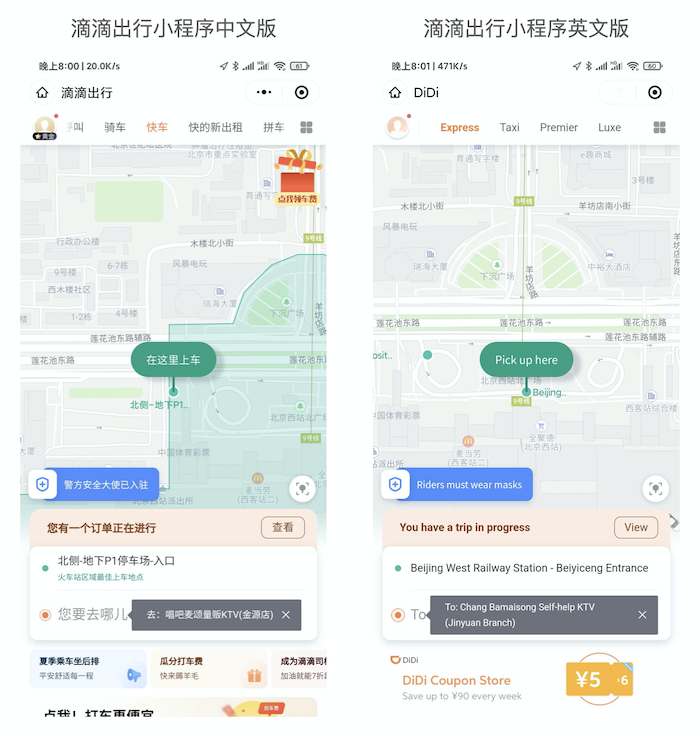
Internationalization Is Content and Runtime Governance
i18n is short for internationalization. For an application, it is not only translation. It includes:
- How copy is collected and named.
- How translation resources are maintained.
- How templates and JavaScript read text consistently.
- How dates, times, numbers, and currency are formatted.
- How UI updates when the locale changes.
- How server-delivered copy works with frontend copy.
- How multiple business lines follow the same convention.
For a large Mini Program, the difficulty is not one $t('hello') call. The difficulty is governance at scale: many business lines, pages, platforms, and teams. Any temporary convention becomes expensive later.
Treat Copy as an Asset First
The first step should not be code changes. It should be copy inventory.
Copy usually comes from several sources:
- Static text in frontend templates.
- Toasts, dialogs, and error messages in JavaScript.
- Default copy inside component libraries and shared libraries.
- Server-delivered campaign, order, status, and operation text.
- Text embedded in images, icons, empty states, and marketing assets.
Without inventory, the team will keep finding pages where most text is English but one dialog remains Chinese.
A reusable approach:
- Give every text item a stable key instead of using Chinese text as the key.
- Organize keys by domain and page, such as
order.detail.cancelTitle. - Decide which copy belongs to frontend language packs and which is delivered by the server according to locale.
- Review new copy during code review to prevent new hardcoded strings.
- Define fallback behavior so missing keys do not produce blank UI.
Once copy has structure, translation, testing, and incremental maintenance become manageable.
Mini Program Runtime Constraints Matter
In Web applications, calling JavaScript functions from template expressions is natural. Mini Programs are different.
Taking WeChat Mini Program as an example, the runtime separates the logic layer and rendering layer:
- JavaScript runs in the logic layer.
- The rendering layer displays the page.
- Data is passed from logic to rendering through
setData. - The rendering layer cannot execute normal JavaScript.
- WXS is a view-layer scripting capability.
This creates an important issue: if every translation happens in the logic layer and then gets passed to the template through setData, locale changes and list rendering can increase cross-thread communication.
An i18n solution has to respect runtime boundaries, not only API design.
Why Template Translation Functions Matter
The ideal usage should feel close to Web i18n:
<template>
  <view>{{ $t('message.hello', { name: userName }) }}</view>
  <view>{{ formattedDatetime }}</view>
</template>
JavaScript should use the same capability:
import mpx, { createComponent } from '@mpxjs/core'

createComponent({
  ready () {
    console.log(this.$t('message.hello', { name: 'Didi' }))
    this.$i18n.locale = 'en-US'
  },
  computed: {
    formattedDatetime () {
      return this.$d(new Date(), 'long')
    }
  }
})
This API looks simple, but two problems sit behind it:
- Can the template execute a translation function directly?
- Can JavaScript reuse the same language pack and formatting logic?
Mpx solves this by generating WXS translation functions at build time from the language dictionaries, then injecting them into templates that use translation calls. On the JavaScript side, the corresponding logic is transformed and injected into the runtime.
Templates and JavaScript can then share a unified i18n API while avoiding unnecessary cross-thread data transfer.
Language Packs Belong in the Build System
A language pack configuration can look like this:
new MpxWebpackPlugin({
  i18n: {
    locale: 'en-US',
    messages: {
      'en-US': {
        message: {
          hello: '{name} world'
        }
      },
      'zh-CN': {
        message: {
          hello: '{name} 世界'
        }
      }
    }
  }
})
Language packs can be inline, but large projects should keep them as separate modules because translation resources need review, testing, and continuous maintenance.
Putting language packs into the build system has several benefits:
- Templates, JavaScript, and components use the same resources.
- Build steps can check whether keys exist.
- Language pack changes do not bypass the application build.
- Multiple platform outputs can share one configuration.
- Date, number, plural, and other formatting features can be extended later.
If i18n resources live outside the build flow, teams can easily update a language pack but forget to regenerate some intermediate artifact.
Cross-Platform Differences Should Stay in the Framework
Mini Program internationalization has another challenge: view-layer scripting differs across platforms.
WeChat has WXS. Alipay has SJS. Other platforms have their own syntax and runtime restrictions. Business developers should not handle these differences in every page.
Mpx absorbs this at the framework and build-system level. It can use WeChat WXS as a DSL, parse and transform it during build, then output scripts that different platforms can understand. Template-side and JavaScript-side i18n both build on this capability.
The reusable principle is: cross-platform differences should be absorbed by the framework and build system, not leaked into business code.
The closer business code stays to one unified API, the cheaper future locale and platform expansion becomes.
Tradeoffs Compared with Other Approaches
One approach is to compute translated text in the logic layer and pass it into templates. This is easy to understand, but it increases setData communication. In list rendering, it can also enlarge data transfer. It may work for small projects, but it becomes expensive in large and complex pages.
Another approach is the official WeChat i18n solution, which also uses view-layer scripting. But if the surrounding build process, JavaScript injection, cross-platform adaptation, and reactive locale updates are not unified, integration can still feel fragmented.
The value of Mpx is not only that it can translate text. It connects the whole flow:
- Language packs are injected at build time.
- Templates can call translation functions directly.
- JavaScript uses the same API.
- Locale changes can trigger reactive updates.
- Cross-platform output is handled by the framework.
- Web output can reuse an experience close to vue-i18n.
For large projects, the key question is whether the whole chain is closed, not whether one API exists.
Reusable Methodology
The Didi i18n work can be summarized into several steps.
1. Inventory Copy and Define Ownership
Classify all text by source: frontend static copy, server-delivered dynamic copy, component-library copy, and marketing asset copy. Decide ownership before changing code.
2. Design Stable Keys
Chinese source text changes. Business copy changes. Keys should describe domain meaning and location, not depend on the current wording.
3. Put Language Resources into Build and Review
Every new page, component, toast, and dialog should add language keys. Code review should catch new hardcoded copy.
4. Choose Translation Execution Location Based on Runtime
Web, Mini Program, React Native, and Flutter have different runtimes. Where translation executes affects performance and maintainability. Mini Programs especially need to consider communication between logic and rendering layers.
5. Keep One Business API
Business developers should use capabilities such as $t, $d, and $n. They should not need to care about WXS, SJS, or platform-specific runtime details.
6. Turn Testing into a Product Checklist
i18n testing should cover:
- First screen and core workflows.
- Toasts, dialogs, error states, and empty states.
- Long English text causing wrapping or truncation.
- Date, time, amount, and units.
- Server-delivered copy.
- UI updates after locale switching.
- Differences across platform outputs.
7. Accept That i18n Affects Product Design
Chinese text is short. English can be much longer. Some languages have plural forms. Some regions need different phrasing. Internationalization is not a final translation layer. It pushes component layout, copy length, and information structure to become more resilient.
Conclusion
The core lesson from Didi Mini Program’s English version was not “choose an i18n library.” It was to treat internationalization as an engineering system.
Copy needs asset management. Language packs need to enter the build. Templates and JavaScript need one API. Cross-platform differences need to be absorbed by the framework. Testing needs to cover real business paths.
For large Mini Programs, the hard part of i18n is not the translation function itself. It is scaled collaboration and runtime constraints. Once those two are handled, multilingual support stops being a long-term maintenance burden.
Loading discussion...
Discussion failed to load. Reload